Persona Selection
Persona Selection Guide
Overview
Choosing the right persona is crucial for getting targeted insights. This guide helps you select the most appropriate persona for your specific needs and navigate the selection interface effectively.
Accessing Persona Selection
Navigation
- Click "Personas" in the sidebar
- Or switch personas from within a chat
- Direct URL: https://trends.silainsights.com/personas
Selection Interface
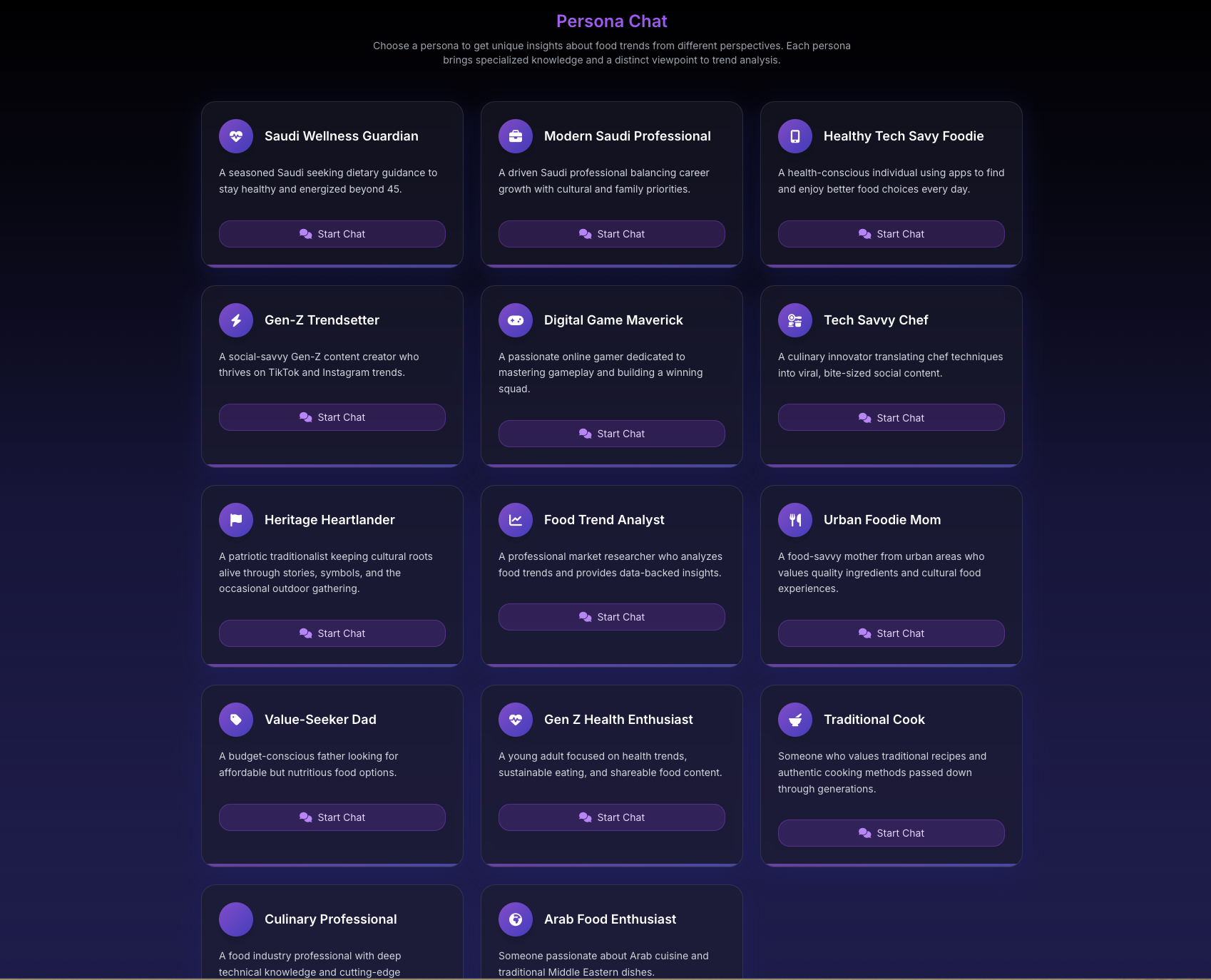
- Persona Grid: Visual card layout
- Persona Details: Hover for information
- Active Indicator: Shows current persona
- Quick Info: Expertise summary
- Selection Button: Click to choose
The Selection Screen
Persona Cards Display
Each card shows:
- Persona Name: Role title
- Avatar/Icon: Visual identifier
- Expertise Tags: Key areas
- Brief Description: One-line summary
- Specialty Badge: Primary focus
- Select Button: Activation control
Card States
- Available: Ready to select
- Active: Currently selected
- Hover: Expanded details
- Disabled: Not available (plan restrictions)
Selection Criteria
By Business Need
Product Development
Best Personas:
- Consumer Psychologist - User needs
- Trend Expert - Future directions
- Innovation Strategist - Technical possibilities
Questions to Consider:
- What problem are you solving?
- Who is your target audience?
- What's the innovation opportunity?
Market Analysis
Best Personas:
- Market Analyst - Business metrics
- Regional Specialists - Geographic insights
- Trend Expert - Market evolution
Questions to Consider:
- What's the market size?
- Who are the competitors?
- What's the growth potential?
Strategic Planning
Best Personas:
- Innovation Strategist - Future scenarios
- Market Analyst - Business case
- Sustainability Expert - Long-term impact
Questions to Consider:
- What are future scenarios?
- What's the business model?
- What are sustainability implications?
By Information Type
Quantitative Data
Choose: Market Analyst
- Market sizes
- Growth rates
- Financial metrics
- ROI calculations
Behavioral Insights
Choose: Consumer Psychologist
- Purchase motivations
- Usage patterns
- Emotional drivers
- Decision factors
Geographic Information
Choose: Regional Specialists
- Local preferences
- Cultural factors
- Regulatory environment
- Distribution channels
Future Predictions
Choose: Trend Expert
- Emerging patterns
- Evolution timeline
- Next developments
- Long-term outlook
By Industry Focus
Products & Services
Primary: Consumer Psychologist, Trend Expert Secondary: Regional Specialists, Sustainability Expert
Technology Products
Primary: Innovation Strategist, Market Analyst Secondary: Trend Expert, Consumer Psychologist
Sustainable Products
Primary: Sustainability Expert, Consumer Psychologist Secondary: Market Analyst, Innovation Strategist
Regional Expansion
Primary: Regional Specialists Secondary: Market Analyst, Consumer Psychologist
Making Your Selection
Step-by-Step Process
-
Identify Your Goal
- What do you need to learn?
- What decision are you making?
- What's your timeframe?
-
Review Persona Options
- Read descriptions
- Check expertise areas
- Consider perspective needed
-
Evaluate Match
- Does expertise align with need?
- Is perspective relevant?
- Will insights be actionable?
-
Make Selection
- Click chosen persona
- Confirm selection
- Start conversation
Quick Selection Tips
For Beginners
- Start with Market Analyst for general business insights
- Try Trend Expert for understanding patterns
- Use Consumer Psychologist for user understanding
For Specific Regions
- North America: US/Canada specialist
- Europe: European markets expert
- Asia: APAC specialist
- Global: Market Analyst or Trend Expert
For Innovation
- Innovation Strategist for disruption
- Trend Expert for emerging patterns
- Sustainability Expert for green innovation
Selection Interface Features
Hover Information
When hovering over persona:
- Expanded Description: Detailed expertise
- Sample Questions: Example queries
- Best Use Cases: Ideal scenarios
- Recent Topics: What others ask
- Compatibility Score: Match to your history
Filtering Options
- By Expertise: Technical, Business, Consumer
- By Region: Geographic specialists
- By Industry: Sector focus
- By Availability: Based on plan
Search Function
- Search by name
- Search by expertise
- Search by keyword
- Search use cases
Multi-Persona Strategy
Sequential Selection
Use personas in order:
- Broad Overview: Start with Trend Expert
- Business Analysis: Then Market Analyst
- Consumer Insight: Follow with Psychologist
- Regional Factors: End with Regional Specialist
Parallel Comparison
Ask same question to multiple:
- Note different angles
- Compare insights
- Identify consensus
- Find unique perspectives
Complementary Pairing
Combine for complete picture:
- Launch Planning: Market Analyst + Consumer Psychologist
- Innovation: Trend Expert + Innovation Strategist
- Expansion: Regional Specialist + Market Analyst
- Sustainability: Sustainability Expert + Consumer Psychologist
Selection Best Practices
Do's
Read persona descriptions carefully Match expertise to your needs Consider multiple personas for complex topics Note which personas work best for you Save successful persona choices
Don'ts
Choose randomly Use wrong persona for topic Ignore expertise boundaries Expect universal knowledge Switch too frequently
Common Mistakes
- Using Market Analyst for creative ideas - Try Innovation Strategist
- Asking Regional Specialist about global trends - Use Trend Expert
- Expecting Consumer Psychologist to know regulations - Try Regional Specialist
- Using one persona for everything - Diversify for better insights
Tracking Persona Performance
Which Personas Help Most?
Track:
- Most useful insights
- Best answers
- Relevant recommendations
- Actionable advice
Building Persona Preferences
- Note successful selections
- Document use cases
- Create selection patterns
- Share with team
Mobile Selection
Touch Interface
- Tap to view details
- Swipe through options
- Long press for info
- Double tap to select
Mobile Optimization
- Simplified cards
- Essential info only
- Easy selection
- Quick switching
Troubleshooting Selection
Can't Select Persona
- Check subscription level
- Verify persona availability
- Ensure not already active
- Refresh page
- Contact support
Wrong Persona Selected
- Return to selection screen
- Choose correct persona
- Start new conversation
- Save important insights first
Persona Not Responding Well
- Verify right persona for topic
- Rephrase question
- Provide more context
- Try different persona