Story Creation
Story Creation Guide
Overview
Story Creation in Sila TrueTrends transforms semantic social trend data and insights into shareable narratives and reports. Create professional stories about emerging trends from social media conversations to share with your team or stakeholders.
Creating Your First Story
What Are Trend Stories?
Definition
Trend stories are comprehensive reports that combine:
- Social media trend analysis
- Semantic insights from conversations
- Data visualizations
- Market context
- Key findings and implications
- Actionable recommendations
Use Cases
- Share social trend insights with your team
- Present emerging signals to stakeholders
- Document trend research and analysis
- Create reports for strategic decision-making
- Build presentations on market opportunities
How to Create a Story
Step 1: Access Story Creation
Stories can be created from:
- Trends Dashboard: Select a trend and click "Create Story"
- Chat Interface: Ask the AI to generate a story about a trend
- Trend Details Page: Use the "Generate Story" button
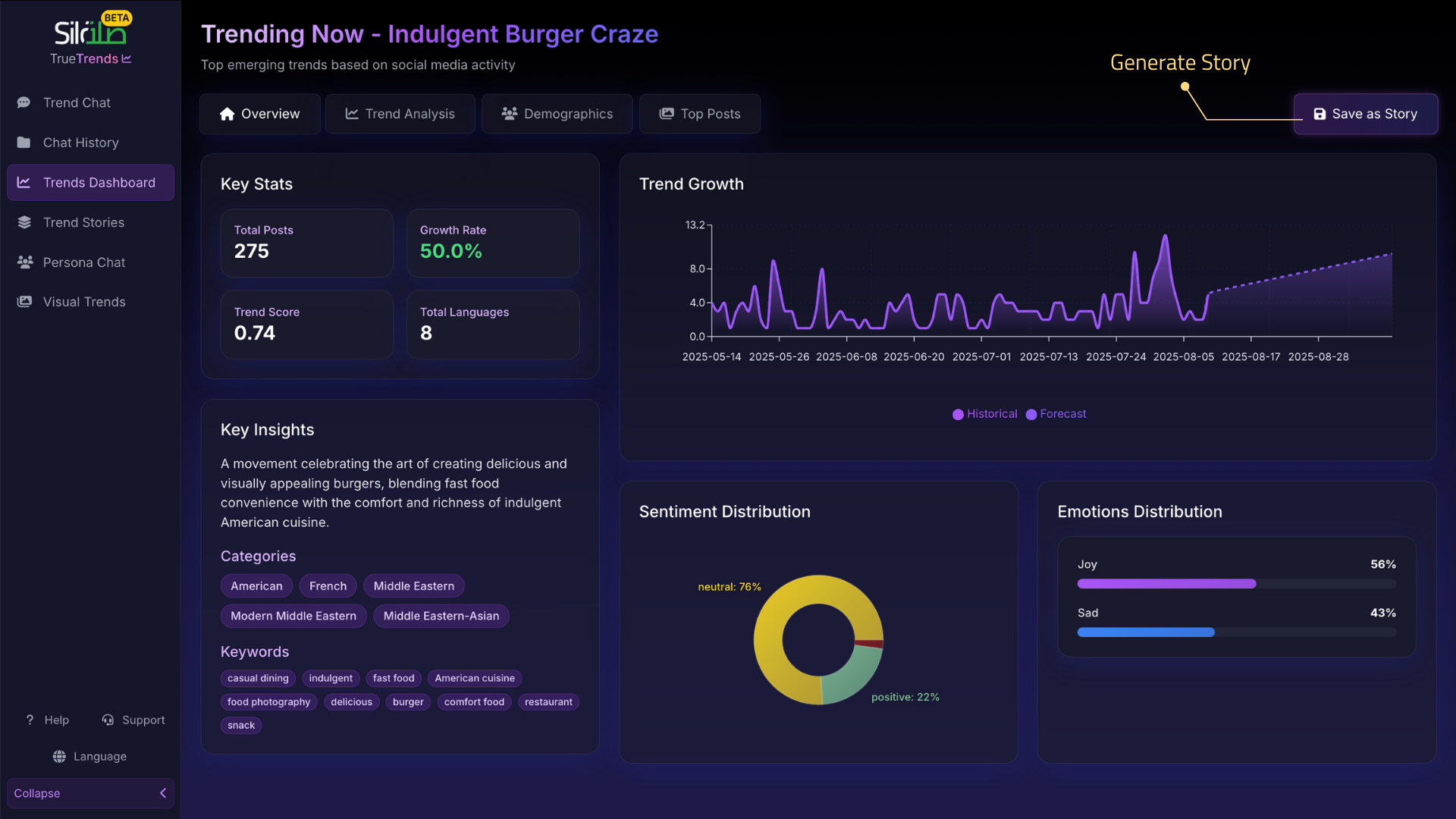
Step 2: Story Generation
The system automatically:
- Gathers relevant social media data
- Analyzes semantic patterns
- Identifies key insights
- Creates visualizations
- Structures the narrative
- Generates the complete story
Step 3: Review Your Story
Once generated, your story includes:
- Title: Clear, descriptive headline
- Summary: Executive overview of the trend
- Data Visualizations: Charts, graphs, and trend curves
- Social Signals: Key conversations and sentiment
- Market Implications: Business opportunities
- Recommendations: Actionable next steps
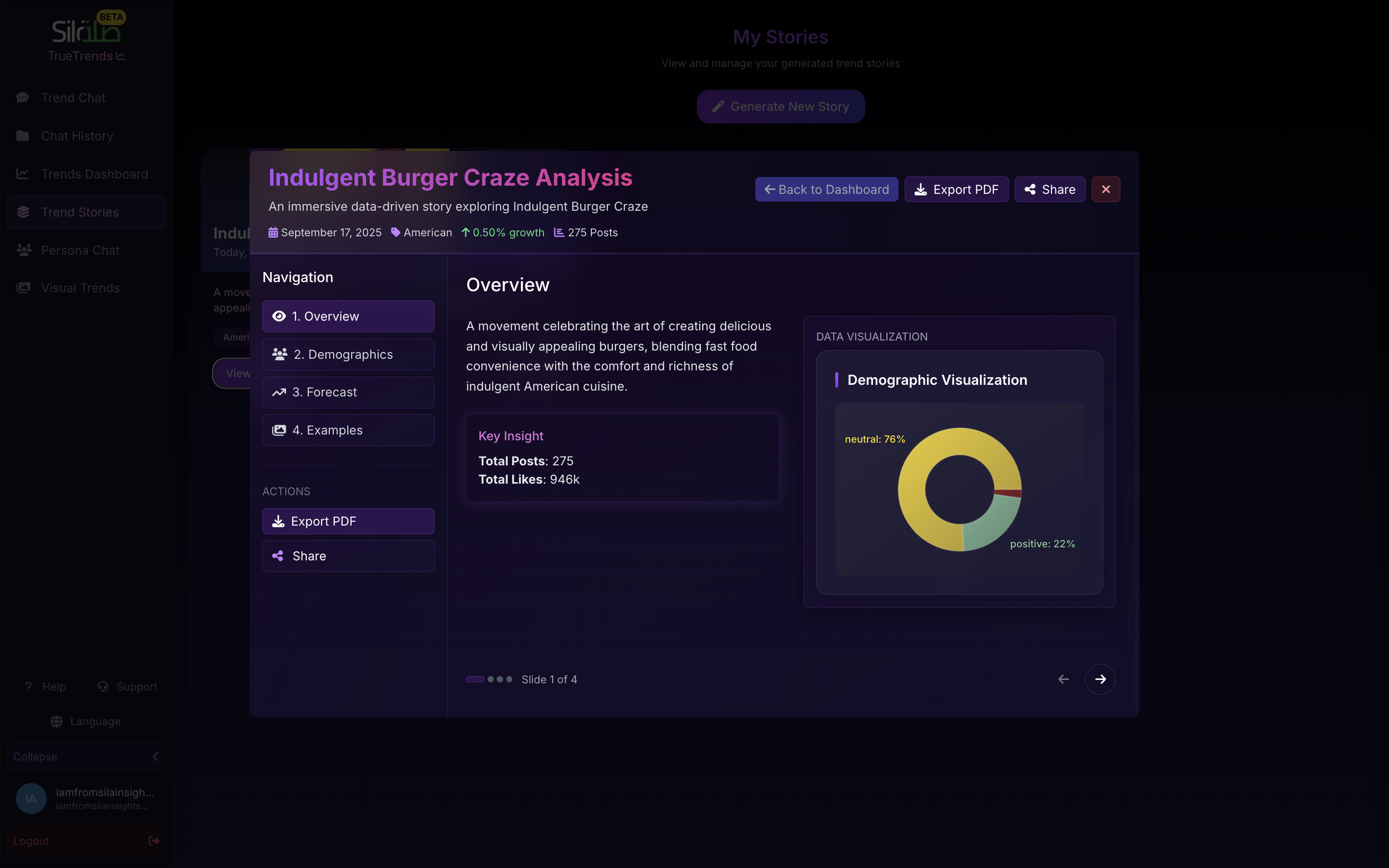
Story Components
Executive Summary
- Brief overview of the trend
- Why it matters now
- Key statistics and metrics
- Main implications for business
Trend Analysis
- Historical context and evolution
- Current state and momentum
- Growth metrics and velocity
- Social media drivers
Social Insights
- Key conversations driving the trend
- Sentiment analysis
- Demographic breakdown
- Geographic distribution
- Platform-specific patterns
Market Implications
- Business opportunities
- Competitive landscape
- Potential challenges
- Strategic considerations
Recommendations
- Action items based on data
- Next steps for implementation
- Areas to monitor
- Timing considerations
Managing Your Stories
Viewing Stories
- Navigate to Stories in the sidebar
- Browse your created stories
- Click any story to view full details
- Stories display with thumbnails and excerpts
Sharing Stories
- Copy Link: Share story URL with colleagues
- Export: Download story content in PDF
- Collaborate: Work with team members
Deleting Stories
- Select the story you want to remove
- Click delete option
- Confirm deletion
- Story is permanently removed
Best Practices
Creating Effective Stories
- Choose significant trends: Focus on trends with strong social signals
- Provide business context: Include why the trend matters to your industry
- Be data-driven: Let social data guide the narrative
- Update regularly: Create new stories as trends evolve
Story Examples
Example 1: Sustainability Movement
Focus: Growing eco-conscious consumer conversations Key Insights: Demographics, sentiment, brand mentions Recommendations: Product positioning opportunities
Example 2: Digital Transformation
Focus: Technology adoption trends from social data Key Insights: Industry variations, pain points, success stories Recommendations: Innovation areas, implementation strategies
Example 3: Wellness Culture
Focus: Health and wellness conversations online Key Insights: Emerging practices, influencer impact, regional differences Recommendations: Market entry points, content strategies
Example 4: Creator Economy
Focus: Monetization and platform trends Key Insights: Platform preferences, revenue models, audience behavior Recommendations: Partnership opportunities, platform strategies
Tips for Success
Do's
- Create stories for trends with strong social signals
- Focus on actionable insights from semantic data
- Use stories to track trend evolution over time
- Share with relevant stakeholders promptly
- Archive important findings for future reference
Don'ts
- Create too many stories at once
- Include outdated social data
- Ignore the business context
- Forget to validate insights
- Overlook regional variations
Mobile Experience
Mobile Capabilities
- View stories on any device
- Share stories easily
- Browse story library
- Read full story content
Desktop Recommended For
- Creating new stories
- Detailed analysis
- Exporting content
- Managing multiple stories
Troubleshooting
Story Won't Generate
Try:
- Ensure trend has sufficient social data
- Check your internet connection
- Refresh the page
- Try a different trend with stronger signals
Missing Data
Try:
- Select a trend with more social activity
- Choose recent time period
- Check data availability
- Contact support if persistent
Frequently Asked Questions
Q: How many stories can I create? A: Create as many stories as needed for your research and reporting.
Q: Can I edit stories after creation? A: Stories capture a moment in time. Create new stories for updated insights as trends evolve.
Q: Who can see my stories? A: Stories are private to your account unless you explicitly share them.
Q: How long are stories saved? A: Stories remain in your account until you delete them.
Q: Can I export stories? A: Yes, stories can be exported in various formats for use in presentations and reports.
Q: What data sources are used? A: Stories analyze semantic patterns from social media conversations across multiple platforms.